


Track Me Fast Package Tracker
4.226.00 Reviews
App Specs
- Version
- 1.15.6
- Updated On
- License
- Free
- Downloads
- 10,000+
- Developer
- B1 Group Software
- Categories
- Shopping
- Platform
- Android
Screenshots
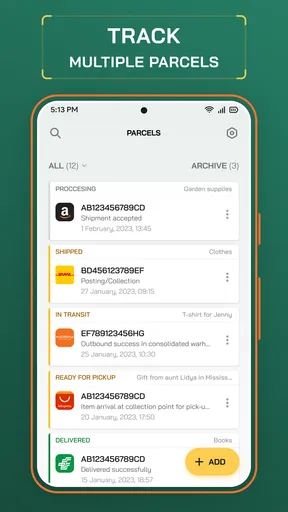
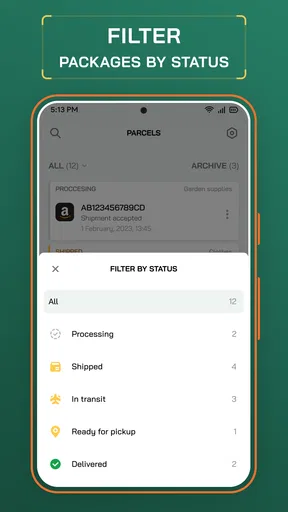
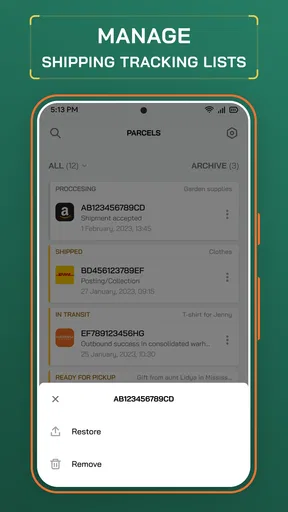
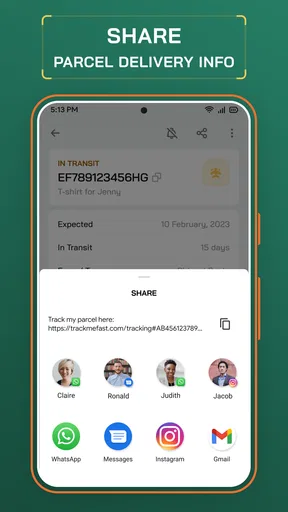
 Analysis by AppCompare
For people who order from several shops, the annoying part of delivery day is often not the wait itself but keeping track of which message belongs to which parcel. Track Me Fast Package Tracker is a free shopping app from B1 Group Software that brings shipment tracking into one place. I’d consider it when I want a clearer routine for checking parcels, rather than switching between order emails and courier pages every time I wonder where something is.
A practical routine for several orders
The simplest way to use a tracker is to add each parcel when an order is dispatched, then check the app when a meaningful update arrives. That small habit is more useful than trying to remember tracking numbers later, especially if several orders are moving at once. I’d keep the order confirmation or dispatch email until the parcel is safely delivered, so I can quickly compare the tracking number if an update seems to belong to the wrong purchase.
A realistic example: I order household supplies from one shop and a birthday gift from another in the same week. Instead of searching my inbox each time I want an update, I can check the tracking entries together and decide which delivery needs attention first. The gift may be time-sensitive, while the supplies can wait. This is where an overview helps: it reduces mental juggling, even though it cannot make a courier move faster.
The app is aimed at ordinary parcel tracking, not at managing a whole shopping operation. If you receive occasional online orders, it may be more convenient to keep the information together than to bookmark several courier sites. If you only buy something now and then, the shop’s own dispatch email may already be enough; installing another app could add little value.
Easy Setup and User-Friendly Interface
Right off the bat, what struck me was how easy it was to set up Track Me Fast Package Tracker. I downloaded it from the app store, and within minutes, I was ready to go. The onboarding process is straightforward and intuitive. You just input your tracking numbers, and the app does the rest. It's like magic!
The interface is clean and straightforward. I appreciate the minimalist design that doesn't overwhelm with unnecessary features. Everything you need is right there, and it’s easy to navigate even for the less tech-savvy among us. The app supports a wide range of couriers, so you don't have to worry about compatibility issues.
Real-Time Notifications and Updates
One of my favorite features is the real-time notifications. Imagine this: you're going about your day, and suddenly, a notification pops up letting you know that your package has just left the local distribution center. It's like the app is whispering sweet logistics updates in your ear. These notifications are incredibly helpful, especially if you're someone who can't stand the suspense of waiting.
Worth Reading Before You Choose

Flipboard Shows What News Apps Must Do Beyond the Feed

Switching to Android Auto Means Rethinking Your Driving Routine

Google Calendar Makes a Crowded Week Easier to Manage

Ludo King Makes the Most of the Minutes Between Plans

Baby Panda World Brings Quick Play to Modern Phones, but Its Game Library Feels Busy

ESPN’s Live Game View Makes Following Close Games Easier
Furthermore, you can customize these alerts to suit your preferences. Whether you want to know every single movement of your package or just the major milestones, Track Me Fast has got you covered. This flexibility is a game-changer for me.
Comprehensive Tracking History
Another feature that won me over is the detailed tracking history. With a few taps, you can view the entire journey of your package. It's like unfolding a mini-map of your delivery's adventure. This history is neatly organized, allowing you to see where potential delays might have occurred. It's a detective tool for the curious mind!
Having this history at your fingertips means you can easily reference it if you need to follow up with the courier service. It’s not just about knowing where your package is now, but understanding its journey.
Using alerts without creating more noise
Customizable updates are most useful when I match them to the parcel’s importance. For something I need to be home to receive, I’d leave more alerts on; for a routine replenishment, milestone-only updates are less distracting. If notifications become a stream of small movements, I’m more likely to ignore the one that matters. A quick review of alert preferences when adding a time-sensitive order helps keep the app useful rather than noisy.
There is also a practical distinction between a tracking event and a guaranteed delivery time. A scan can tell me that a parcel has moved through a stage, but I still treat estimates as plans rather than promises. If I have to coordinate a handoff, I would keep checking the latest status and use the retailer or courier’s own channel for any urgent delivery instructions.
Comprehensive Tracking History
Another feature that won me over is the detailed tracking history. With a few taps, you can view the entire journey of your package. It's like unfolding a mini-map of your delivery's adventure. This history is neatly organized, allowing you to see where potential delays might have occurred. It's a detective tool for the curious mind!
Having this history at your fingertips means you can easily reference it if you need to follow up with the courier service. It’s not just about knowing where your package is now, but understanding its journey.
A useful approach when a parcel stalls
When a delivery appears stuck, I find it helpful to note the most recent event and its date before contacting support. That gives me a concise starting point instead of retelling the parcel’s whole trip from memory. I would then check the retailer’s order page or the courier’s own tracking page if the next step depends on a delivery change, a missed handoff, or a claim. A tracking app is good for visibility; it is not a substitute for the party that can actually investigate or alter a shipment.
The history can also help distinguish a genuine pause from a parcel that has simply not received a new scan yet. I wouldn’t assume that no visible movement means the package is lost. I’d give the status some context, compare it with the expected delivery window, and escalate through the seller or carrier only when the situation warrants it. That prevents needless support messages while still making it easier to explain a real problem.
Seamless Integration with Other Apps
In today’s interconnected world, apps need to play well with others, and the tracker does just that. The app integrates smoothly with your email and calendar, automatically pulling tracking numbers from your inbox and scheduling expected delivery dates. It’s like having an organized friend who keeps everything in check for you.
This seamless integration enhances the overall experience and ensures you never miss an important delivery. Plus, it saves you the hassle of manually entering tracking details.
Check the setup that suits your privacy and habits
Automatic email handling is convenient, but it is not the right choice for everyone. If I prefer to keep shopping messages separate or want to decide what information enters a tracking app, manual entry gives me more control, even if it adds a little effort. Before relying on inbox-based organization, I’d check the app’s current settings and choose the approach that feels comfortable. For a shared device or a work phone, I’d be especially deliberate about what account is connected.
Calendar entries can help when I need a visible reminder to be available, but I would not plan around an estimate as if it were a confirmed appointment. I’d use the calendar as a prompt to check the current status, not as proof that the parcel will arrive at a particular moment. This distinction keeps a helpful reminder from turning into a frustrating expectation.
Where a tracker helps—and where it doesn’t
Compared with checking each retailer’s order page, a dedicated tracker can be more convenient when purchases are spread across shops or carriers. Compared with a carrier’s own app, it is better suited to gathering multiple shipments than handling carrier-specific requests. If I need to redirect a delivery, resolve a failed attempt, or ask about a detailed exception, I’d go directly to the responsible retailer or courier. The central view is useful for seeing the picture; the original service remains the place for action.
For a person who buys online frequently, that division of labor is a sensible trade-off: use the tracker for routine awareness and the carrier’s channel when a parcel needs intervention. Someone who mainly uses one courier may prefer that courier’s app, particularly if they rely on its own delivery controls. Someone who wants no extra tracking app at all can stick with retailer emails and search their inbox when needed.
Faster habits for repeat use
Experienced users can make parcel tracking feel less like a chore without assuming the app has hidden shortcuts. I’d add tracking details as soon as they are available, use consistent names or notes if the app offers a way to distinguish parcels, and remove the mental clutter by checking the list at a regular moment rather than opening it every few minutes. If naming options are not available in a particular setup, keeping the order email nearby is a simple fallback for identifying a shipment.
For households with deliveries for more than one person, I’d agree on a basic routine before relying on one person’s phone: who checks the status, who is home to receive a parcel, and where to find the original order details. The tracker can make updates easier to see, but it does not automatically coordinate family plans. That small bit of communication avoids duplicate checking and the familiar “Did you see where it is?” exchange.
Track Me Fast Package Tracker has a 4.2 average from over 400 ratings, and it has passed 10,000 installs. It is free to install, rated for Everyone, and its current version is 1.15.4; optional in-app purchases range from $0.99 to $39.90 per item. It was released on March 10, 2023, and supports devices running Android 7.0 or later. Those details make it accessible to a broad range of Android users, though the optional purchase range is worth noticing if you prefer apps with no paid extras at all.
Final Thoughts
In conclusion, Track Me Fast Package Tracker is a must-have for anyone who frequently orders online or simply wants a reliable way to track deliveries. It takes the stress out of tracking packages by providing real-time updates, a comprehensive history, and seamless integration with your other apps. The user-friendly interface and customizable notifications make it a joy to use.
Whether you’re waiting for a new gadget or sending a gift to a loved one, this app ensures you stay informed every step of the way. So, if you haven't already, give it a try—you might just find yourself wondering how you ever managed without it!
My recommendation is strongest for people juggling parcels from different shops who want one place to check before digging through messages. I’d skip it if I rarely receive deliveries, dislike connecting email to shopping tools, or need advanced control over a particular carrier’s delivery process. Used as a calm overview rather than a promise of exact timing, it can make the wait easier to manage without pretending to solve every shipping problem.
Pros
- Easy-to-use interface for quick tracking.
- Supports multiple courier services.
- Real-time notifications for updates.
- Customizable tracking alerts.
- Minimal battery consumption.
Cons
- Occasional delays in update notifications.
- Limited offline tracking capabilities.
- Requires internet for full functionality.
- Some ads in the free version.
- No dark mode option available.
FAQs for Track Me Fast Package Tracker
What features does Track Me Fast Package Tracker offer?
Track Me Fast Package Tracker provides real-time updates for your packages, supporting multiple carriers worldwide. You can receive notifications on your delivery status, view detailed tracking history, and manage all your shipments in one place. Its user-friendly interface ensures easy navigation and efficient tracking.
Is Track Me Fast Package Tracker available for both Android and iOS?
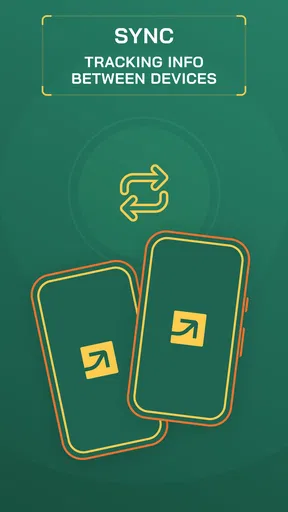
Yes, Track Me Fast Package Tracker is available for download on both Android and iOS platforms. You can find it on the Google Play Store and Apple App Store, ensuring accessibility no matter which device you use. It provides a seamless tracking experience across all devices.
Does Track Me Fast Package Tracker support international shipping?
Absolutely, Track Me Fast Package Tracker supports a wide range of international carriers, allowing you to track packages from around the globe. Whether your package is coming from a nearby city or another continent, the app offers comprehensive tracking capabilities to keep you informed.
Are there any costs associated with using Track Me Fast Package Tracker?
Track Me Fast Package Tracker offers a free version with essential tracking features. However, there might be premium options available for users seeking advanced functionalities, such as ad-free usage or additional customization options. Check the app store for specific pricing details.
How secure is my personal information with Track Me Fast Package Tracker?
Track Me Fast Package Tracker takes user privacy seriously and employs robust security measures to protect your personal information. The app uses encryption and secure servers to ensure that your data remains confidential and is not shared with third parties without your consent.


